Multi-Store Inventory Management in India: The Complete Guide for Retail Chains
 By Sandeep Singh, Co-Founder · · 16 min read
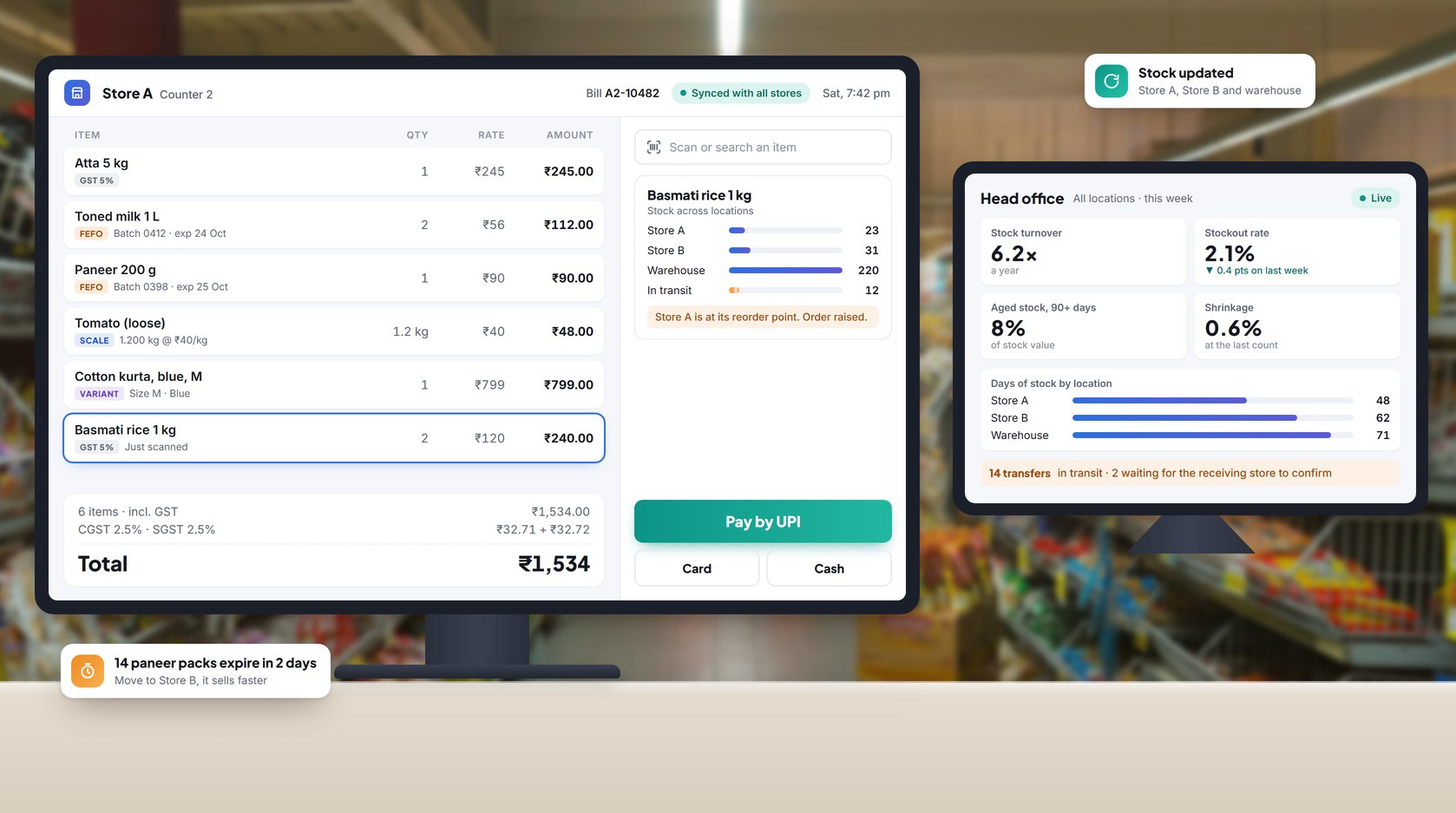
The short answer
Multi-store inventory control works when every store sells from one shared stock record, every product has one item code, and every stock movement is entered the same day. It usually slips when a chain outgrows spreadsheets and phone calls: two stores hold the same product under different names, a transfer lives on a paper slip, an expiry date lives only on the packet, and nobody trusts the stock figure.
The fix is three habits, not more reports:
- One item master. Each product, and each size or colour of it, has a single code, name, tax rate and price rule, used by every store.
- One live stock figure per store, down to the batch. Every sale, return, transfer and purchase updates it as it happens, with batch and expiry captured where the product has them.
- Counting on a fixed rhythm. Stock is checked against the system on a schedule, and every gap gets an explanation.
This guide covers each habit in order, the GST rules for moving stock between stores, expiry and slow stock, the numbers worth tracking, and a 90-day rollout plan.
What is multi-store inventory management?
Put simply, it's how a retail chain keeps count of its stock across every shop and warehouse it runs, and moves that stock around, from one shared system.
A single-shop owner just walks to the rack and looks. Try doing that with twelve stores spread across a city. So the retail POS and inventory software has to do the looking for you. For any product in any store, someone at head office should be able to see what's on the rack, what's been ordered, what's sitting in a van between two stores, how quickly it's selling and when it goes off.
You'll feel the need for this as soon as a second location opens, be it another shop, a godown, a franchise outlet or your own website.
| Area | One shop | Chain of stores |
|---|---|---|
| Where the stock figure lives | The shelf and the owner's memory | The system, updated the same day |
| Product codes | Informal | One master list, tightly controlled |
| Stock movement | Now and then | Every day, between stores and the warehouse |
| Prices and offers | Set at the counter | Set once at head office, live in every store |
| Expiry and slow stock | Spotted on the shelf | Flagged by the system, store by store |
| Mistakes | Spotted fast | Can go unnoticed for weeks |
Why does stock go wrong as you add stores?
Usually because the records move slower than the goods. These are the problems that come up most often:
- One product, two codes. One store has "Atta 5 kg". Another lists it by brand name and pack size. Reports treat them as different items, so the chain never knows how much of that atta it really has.
- Late entries. Stock entered at the end of the day, or worse, the end of the week, is already out of date when someone orders from it.
- Transfers on paper. Goods leave one store and reach another, and the system has no record of the move. If the slip goes missing, so do the units.
- Prices out of step. A price change reaches one store a week late, and that store keeps billing at last month's rate.
- Expiry checked by eye. No one records batches, so short-dated stock is found after the date has passed.
- The website and the shop disagree. The website sells something that left the shelf an hour ago, meaning it's stock out.
- Count gaps written off. The difference goes into a register, and nobody ever finds out where the stock went.
What does good multi-store inventory control look like?
Each part in this table deals with one of the problems above.
| Part | What it does | What goes wrong without it |
|---|---|---|
| One item master | One code, name, tax rate and price rule per product and variant, used by every store | Duplicate items and stock totals that don't add up |
| One live stock pool | Every sale, return, transfer and purchase updates stock as it happens | Old figures and wrong reorders |
| Batch and expiry tracking | Batch number and expiry date recorded when stock arrives and followed to the till | Expired stock on the shelf and write-offs nobody expected |
| Roles and permissions | Sets who can adjust stock, approve transfers and change prices | Quiet adjustments and prices that differ between stores |
| Central purchasing | No supplier gets paid until the PO, goods receipt, invoice and proof of delivery all agree | Too much ordered, short deliveries, and bills paid for goods that never came |
| Two-step transfers | The sending store dispatches, the receiving store confirms | Stock lost on the way |
| Scheduled counts | Stock is checked against the system on a fixed rhythm | Gaps that grow without anyone seeing them |
Start with the item master. Every transfer, reorder and report reads from it, so one bad code puts the same mistake in all of them.
How do you code product variants, combos and loose items?
This is where most duplicate items come from, so agree the rules before stores start creating items themselves.
- Variants. Keep one parent product, with a separate code for each size, colour or pack size. "Cotton kurta, blue, M" and "Cotton kurta, blue, L" are two stock items that roll up to the same kurta in reports.
- Barcodes at the receiving door. Scan each carton into stock against its purchase order, as well as at the till. If an item arrives without a maker's barcode, print your own label before it goes on the shelf.
- Loose and weighed items. Sabzi, fruit, dry fruits, loose dal: all of it goes on the scale at the counter. Print a scale barcode with the item code and the weight built in, and a sale of 1.2 kg takes exactly 1.2 kg off stock.
- Combos and gift packs. A combo your staff put together in the store should reduce the stock of each item inside it when it sells. A ready-packed combo from the supplier gets its own code, like any other product.
How do you move stock between stores under GST in India?
GST registration decides the rule, whether or not one company owns all the stores. Locations under the same GSTIN count as one registration. Different GSTINs are treated as separate persons, even when the owner and PAN are the same.
| Movement | Document | GST charged? | E-way bill |
|---|---|---|---|
| Between locations under the same GSTIN | Delivery challan | No, not treated as a supply | Needed if the consignment value is above ₹50,000 |
| Between two GSTINs in the same state | Tax invoice | Yes, CGST and SGST | Needed above ₹50,000 |
| Between GSTINs in different states | Tax invoice | Yes, IGST | Needed above ₹50,000 |
A transfer between different GSTINs is a deemed supply under Schedule I of the CGST Act, even if no money changes hands. Its value is generally set under Rule 28. Movement under the same GSTIN uses a delivery challan under Rule 55. An e-way bill may still be needed once the value crosses the limit. ₹50,000 is the general limit, and some states set a higher one for movement within the state.
What your system should do
- Every transfer carries two GSTINs, the sender's and the receiver's. From those two numbers the system can tell whether it needs a delivery challan or a tax invoice, and print the right one.
- Batch numbers and expiry dates travel with the goods. The receiving store should end up with the very batches the other store sent.
- Each challan ties back to what left one store and what reached the other.
- Dispatch and receipt are two separate confirmations, made by different people in different stores.
Run your setup past your CA first. Limits and state e-way bill rules change, and your registrations decide which row of the table applies to you. Sources are listed at the end of this guide.
How do you stop stock expiring on the shelf?
For grocery, FMCG, pharmacy and cosmetics stores, expired stock tends to be one of the largest write-offs on the books.
- Record batch and expiry when stock arrives. The goods receipt is the one moment when the date is easy to capture. Miss it at the door, and nobody is going to go back through the cartons to fill it in.
- Sell first-expiry, first-out (FEFO). The packet closest to its date goes to the front of the shelf and gets billed first. For things without a date, plain first-in, first-out (FIFO) does the job.
- Run an expiry list for each store. Milk, bread and paneer need a look every morning. Packaged food can wait for a weekly list of anything that goes off within the month.
- Act in a fixed order. Move short-dated stock to the sister store that sells that item fastest. If that won't work, mark it down. Return it to the supplier if your terms allow. Write off whatever is left, with a reason code.
- Use batch records for recalls. When a supplier recalls a batch, the system should list every store holding it straight away.
How do you find and clear slow and dead stock?
Slow stock locks up cash and shelf space in one store, while another store may be running short of the same item. For each store, sort every item by the number of days since it last sold.
| Days since last sale | What to do |
|---|---|
| 0–30 days | Normal. Leave it. |
| 31–90 days | Keep an eye on it. Check the reorder point and stop topping it up. |
| 91–180 days | Move it to a store where it sells, or put it on offer. |
| Over 180 days | Time to let it go: send it back to the supplier, pair it with something that sells fast, or cut the price. |
One check before any markdown: is some other store still selling this? If one is, transfer the stock there and sell it at full price.
How should returns go back into stock?
Every return lands in one of three places: back on the shelf, back to the supplier, or in the damaged pile. Make that call the same day.
- Check it at the counter and record which of the three it is.
- Bought at Store A and returned at Store B? Then it's Store B's stock now.
- Tie each return to the bill it came from. Then the refund, the credit note and the stock entry all point to the same sale.
- Watch for a jump in returns of one product, or at one counter. It may be a quality issue or misuse.
Which inventory numbers should a retail chain track?
Track these for each store and each category, as well as for the chain. A chain average hides the store that's overstocked and the one that keeps running out.
| Metric | Formula | What it tells you |
|---|---|---|
| Stock turnover | Cost of goods sold ÷ average inventory | How often in a year the stock on hand sells through and gets replaced |
| Days of stock | 365 ÷ stock turnover | How many days today's stock would last if sales kept going at this pace |
| Sell-through rate | Units sold ÷ units received × 100 | How much of what arrived has sold in the period |
| Stockout rate | SKU-days out of stock ÷ total SKU-days × 100 | How often the shelf is empty when a customer wants the item |
| Shrinkage rate | (Recorded stock − counted stock) ÷ recorded stock × 100 | Stock lost to theft, damage, expiry or entry mistakes |
| Aged stock share | Value of stock unsold for 90+ days ÷ total stock value × 100 | How much of your cash is sitting in slow stock |
Worked example (illustrative figures)
Say a store's cost of goods sold comes to ₹6 crore for the year, and it carries about ₹1 crore of stock at any time. That's a turnover of 6: the shelves empty and refill six times a year. Days of stock is 365 ÷ 6, roughly two months (61 days).
Is 6 good? That depends on what you sell. A grocery store turns its stock far more often than a furniture or jewellery showroom ever will. So hold each store up against its own numbers from last year, and against its sister stores. And pick one method and stay with it. Dividing sales by stock valued at cost gives you a turnover that looks better than it really is.
How do you decide when to reorder, and how much?
Every product, in every store, needs a reorder point: the stock level that tells you it's time to order again. Set it right and the next delivery arrives before the shelf runs dry.
Reorder point = (average daily sales × lead time in days) + safety stock
Safety stock is your buffer for the rush days, and for the supplier who turns up a day late. The usual rough way to work it out:
Safety stock = (highest daily sales × longest lead time) − (average daily sales × average lead time)
Worked example (illustrative)
Take a product that moves 40 units on a normal day and 55 on its best day. The supplier usually delivers in 5 days. In a bad week it's 6.
- Safety stock = (55 × 6) − (40 × 5) = 330 − 200 = 130 units
- Reorder point = (40 × 5) + 130 = 330 units
So once stock is down to 330 units, the next order goes out.
Plan for festive peaks separately
Diwali, Durga Puja, Eid, the wedding season: in the run-up to any of them, last month's sales will look small. Go by the same weeks last year instead. Order earlier too, because suppliers slow down exactly when everyone else is ordering. With short-life stock, buy only what the store can realistically sell before the date.
Central or store-level ordering?
For fast-moving packaged goods, let head office do the ordering. One buyer can see what every store is selling and bargain harder with suppliers. Fresh and local lines are another story. The store team knows what their neighbourhood buys, so let them top up. Go back over the reorder points every quarter. Demand shifts, and so do delivery times.
How do you count stock and control shrinkage?
A once-a-year stocktake tells you stock went missing, but it rarely tells you why. A weekly cycle count of one category in each store finds problems while it's still easy to work out what happened. Save the full count for year-end, or for a store where cycle counts keep showing gaps.
Ground rules that make counts useful
- Have stock counted by someone who doesn't handle it. A cashier shouldn't count the categories they bill.
- Nothing moves in or out of the area while it's being counted. If something has to, write down the exact time.
- Count dated items batch by batch. Otherwise your expiry records drift away from what's on the shelf.
- Found a big gap? Count it again before you touch the figure. And no adjustment goes in without a reason code and a name.
Reading a gap
Dig into a difference and it usually turns out to be one of these: someone miscounted, a delivery was received wrong, the wrong item got scanned at billing, damaged or expired stock was never written off, or something was stolen. Label each gap. Do it for a few weeks and you'll start to see which store has which problem.
Controls that cut losses
Allow only managers to adjust stock. Every void, return and discount should carry the name of whoever did it. And someone at head office should go through the exception report every week. Actually read it.
How do you keep online and in-store stock in sync?
Selling on your own website or app too? Then the site and the stores should share one catalogue and one stock count. Separate counts stop matching within days.
- Same product code, same price rule, same tax rate, whether the customer is online or at the counter.
- The moment someone places a store-pickup or home-delivery order, that item is set aside for them.
- On fast sellers, hold back a few units as a cushion. Then a count that's an hour late won't lead to an order you can't fill.
- When a store reconnects after an outage, whatever it sold while offline should come off stock right away.
When you look at any system, ask the vendor: what happens to stock when a sale is made offline and the internet comes back?
Spreadsheet, billing app or retail ERP: when should you move up?
The table shows where each setup usually stops working.
| Setup | Fits | Starts to break when |
|---|---|---|
| Spreadsheets | One or two stores without many products | More than one person is editing stock, or stores swap goods every day |
| Billing or invoicing app | A single shop or a small group that mainly needs GST bills and basic stock | Goods start moving between stores, you need batch tracking, or head office wants live numbers |
| Subscription retail ERP (for example Ginesys or GoFrugal) | Chains that want a ready product with vendor support | Fees grow with users, counters or stores, or your way of working doesn't fit the product |
| Open-source ERP with an implementation partner (for example Odoo) | Chains that want to customise and cut licence costs | You don't have the skills in-house to run and update it |
| Owned custom platform | Chains with their own ways of working, many integrations or fast growth | You need a working system within days |
Signs you have outgrown your current setup
- Store managers phone head office to ask what stock other stores have.
- Reports from different stores never add up to the same total.
- A price or tax change takes more than a day to reach every counter.
- Staff find expired stock on the shelf before any report flags it.
- Month-end stock gaps can't be traced to a cause.
- Online orders get cancelled because the item wasn't there.
For two to four stores, a billing app or a subscription product is usually the right choice. When per-store fees, integrations or a poor fit with how you work become the problem, an owned platform is worth a look. That's what Silex builds: a retail POS and ERP platform that the chain owns, with no per-store licence.
How does a 53-store grocery chain run one stock pool?
A multi-store Indian grocery and FMCG chain runs procurement, inventory, billing, promotions, eCommerce and analytics on one platform that Silex built for it. The platform went live in 2025. Since then the chain has grown from about 30 stores to 53, across three states, and bills around 1,058 customers a day.
| Measure | Figure |
|---|---|
| Stores on one platform | 53, across 3 states |
| Bills processed | About 380,000 |
| Products managed (SKUs) | 223,908, batch- and expiry-tracked |
| Suppliers | 1,565 |
What the chain did that others can copy
- Went live one store at a time. Each store was running smoothly before the next one switched over, so trading never stopped.
- Kept one catalogue. Head office sets product, price and promotion changes, and every store gets them the same day.
- Recorded batch and expiry at the goods receipt. Every delivery is checked against its purchase order and the supplier's invoice, and the batch and expiry date are captured before the stock is accepted.
- Split transfers by store. A transfer is split by destination store, and any shortfall at the receiving end is reconciled, so head office sees stock movement and margin in one place.
- Reordered from sales. Each store's sales pace drives replenishment, and buyers review the suggested orders.
- Kept selling during outages. Checkouts keep working offline and catch up once the connection is back.
Figures as published on the Silex POS system for retail page. The chain's name is not disclosed.
What does a 90-day rollout look like?
Start with one store and one warehouse, then add the rest in small groups.
Days 1–30: clean the foundation
- Merge duplicate products into one item master, with one code per item and per variant.
- Fix tax rates, units of measure and barcodes, including scale barcodes for loose items.
- Decide which categories need batch and expiry tracking, and who can adjust stock, approve transfers and change prices.
- Pick the pilot store and the warehouse.
Days 31–60: run one store properly
- Do a full opening count in the pilot store, by batch for dated items, and load it as starting stock.
- Bill, receive and transfer only through the system. No side spreadsheets.
- Run weekly cycle counts and the expiry list, and put every gap under a cause.
- Fix the process problems the pilot brings up.
Days 61–90: add stores in waves
- Add two or three stores at a time, each with a full opening count.
- Set reorder points for your best-selling products.
- Start a weekly exception report covering voids, adjustments, unconfirmed transfers and aged stock.
- At the end of month three, review the stock numbers listed earlier.
Before adding more stores, the pilot store's stock should match the physical count, within a margin you set, for four weeks in a row.
FAQ
What is multi-store inventory management?
It means tracking, ordering and moving stock across several shops and a warehouse as one connected system. Every location works from the same product list and the same live stock figures.
How many stores before I need dedicated software?
There's no fixed number. The time to move up is when stock figures stop agreeing between stores, when transfers happen every day, or when head office can't see stock without phoning a manager.
How do I stop duplicate products across stores?
Create one item master with one code per product and per variant. Don't let stores create items on their own. Send new-item requests to one person, who checks each one against the master list.
Is a delivery challan enough for moving stock between my stores?
Only when both stores are under the same GSTIN. Stores under different GSTINs need a tax invoice, and GST is charged. Confirm your setup with your CA.
What is FEFO and do I need it?
First-expiry, first-out means the batch that expires soonest is sold first. You need it for anything with a date on the pack, such as grocery, dairy, medicines and cosmetics. It only works if batch and expiry are recorded when the stock arrives.
What counts as dead stock?
Usually stock that hasn't sold in 90 to 180 days, depending on the category. Check it store by store, because an item that's dead in one store may still sell in another.
How often should I count stock?
Do a weekly cycle count of one category in each store. Keep a full count for year-end, or for any store where cycle counts keep showing large gaps.
What is a good stock turnover for a retail store?
It depends on what you sell. Grocery turns faster than furniture or jewellery. Compare each store with its own past figures and with similar stores.
How do I keep website stock right when shops sell the same items?
Use one shared stock pool, hold stock as soon as an online order is placed, and keep a small buffer on fast-moving items.
Can stores keep billing when the internet is down?
Only if the billing system is built to work offline. Check that sales and stock catch up once the connection is back, and ask how invoice numbers are kept in order across counters.
Sources
- Tally Solutions - Record stock transfers as GST purchases and sales (TallyPrime help)
- BUSY - Multi-location inventory management
- GimBooks - E-way bill for branch transfers between GSTINs
- CA Rajput - Overview on stock transfer vs supply under GST
- Shopify - Inventory formulas
- Shopify - Safety stock vs reorder point
- Cleverence - How to calculate stock turnover rate
- Silex Softwares - POS system for retail (case study figures)
Worked-example figures are illustrative.