What Actually Happens to Your Calendars, Reviews and Owner Data When You Switch Vacation Rental Software? A Week-by-Week Migration Plan
 By Jitender Saini, Co-Founder · · 16 min read
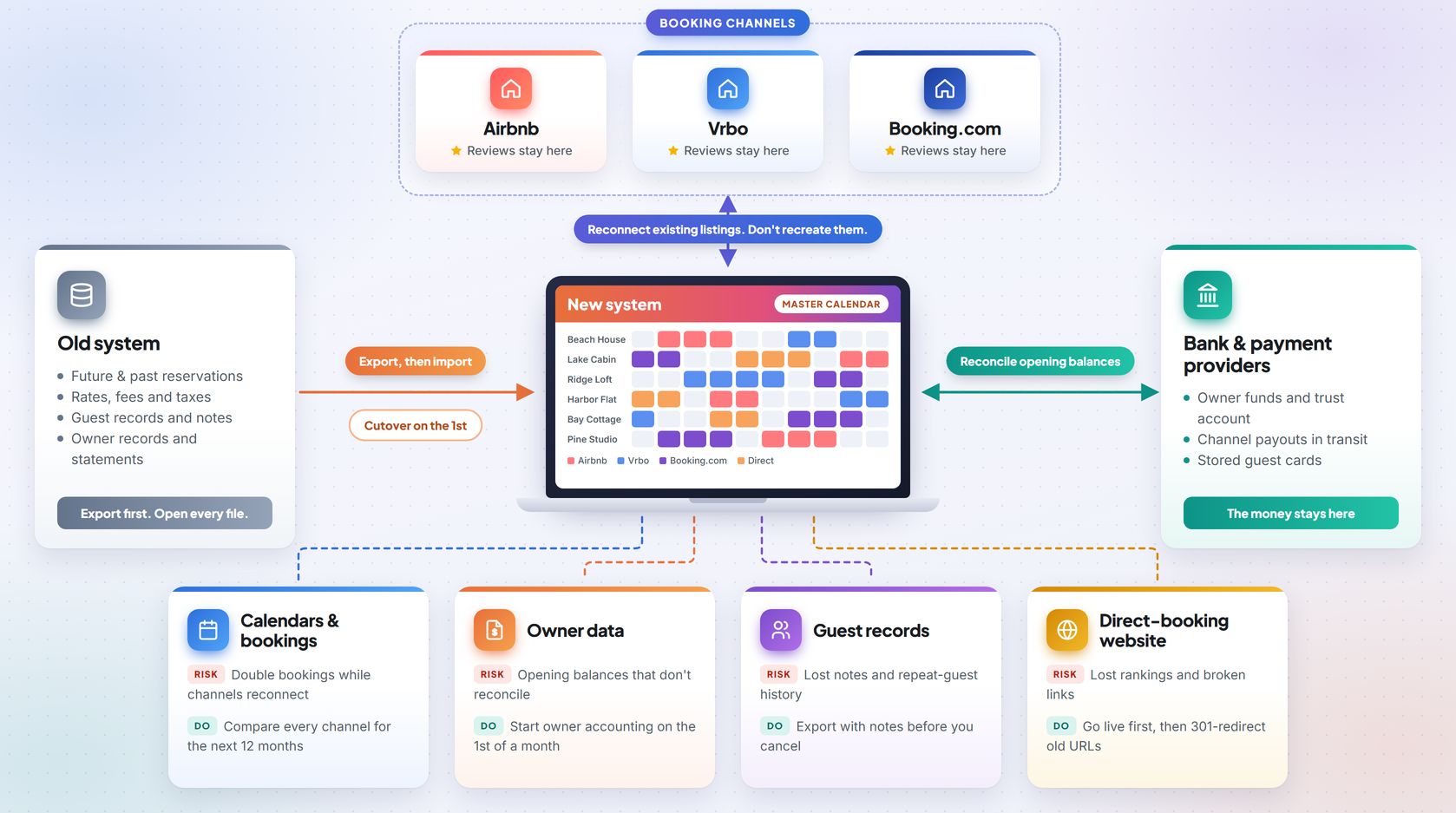
The short answer
Calendars, reviews and owner data each behave differently when you switch vacation rental software. Calendars can double book if channels are reconnected carelessly. Reviews generally stay with the listing on each channel, so reconnect listings instead of recreating them. Owner accounting needs a clean month-start cutover. Plan on about five weeks to cutover and a month to the first close.
Switching software sounds risky, so many managers put it off. The worry is fair for calendars and owner money. For reviews, it depends on how you handle your listings, because reviews sit on the booking channels and not in your software. Each type of data gets its own section below, followed by a week-by-week plan.
What happens to each type of data when you switch
Your software doesn't hold everything. Reviews sit on the booking channels, and money sits with your bank and payment providers. This table shows where each item lives and what to do about it.
| What you have | What happens | Biggest risk | What to do |
|---|---|---|---|
| Calendars and future bookings | They don't move on their own | Double bookings during reconnection | Export first, reconnect in a planned window, compare every channel |
| Reviews on Airbnb, Vrbo and Booking.com | They generally stay with the channel listing | They may not carry over if a listing is recreated or ownership changes | Keep the existing listing and ask the channel first |
| Reviews on your own website | They live in the old software | Lost when the account closes | Export them before canceling |
| Guest records and notes | They move only if you export them | Lost preferences and repeat-guest history | Export with notes and ask what the new vendor imports |
| Owner records, statements and balances | They stay in the old system until you move them | Opening balances that don't reconcile | Save past statements and see the owner data section |
| Stored payment cards | They may or may not move, depending on the processor and setup | Failed balance payments on upcoming stays | Ask both providers and see the note below |
| Rates, fees, taxes and rules | They must be rebuilt or mapped | Wrong prices or taxes go live | Export rate tables and check 10 properties |
Stored payment cards: Ask both payment providers whether the stored cards can be moved securely. If they can't, send guests with future stays a secure payment link from the new system, or collect the balance in another way that your payment provider has approved.
Calendars: what actually happens
Why calendars carry the most risk
Airbnb and Vrbo each keep their own copy of your availability. Your software keeps those copies matching. During a switch, there's a stretch where the old software is disconnected and the new one isn't confirmed yet. A booking that lands in that gap can take dates that are already sold somewhere else.
Some managers cover the gap with iCal links. That's a different method from a direct PMS connection, and the two update at different speeds. For imported iCal calendars, Airbnb's Help Center says the calendar refreshes about every 3 hours, and manual refreshes are rate-limited. Airbnb describes this for calendar sync only, so don't assume it applies to other connection types.
| Aspect | iCal calendar feed | Direct PMS or channel manager connection |
|---|---|---|
| How it works | The channel pulls a calendar file on a schedule | The software and the channel exchange updates through a connection set up between them |
| Update speed | Airbnb says about every 3 hours for imported calendars | Varies by channel and by software, so ask your vendor |
| Manual refresh | Rate-limited on Airbnb | Depends on the software |
| Best use in a switch | A short stopgap | The main connection after cutover |
While an iCal bridge is in place, a guest can book on one channel while another still shows the same dates as open.
How to switch calendars without double bookings
- Export all future reservations, plus the last 12 months as an archive.
- Write down how each channel connects and syncs today.
- Keep a running list of every booking made in the old system after your last import.
- On cutover day, follow the sequence in Week 5. Then compare each channel's calendar with the new master calendar for the next 12 months.
Run these four checks before you call the calendar done:
| Check | How to do it | Pass mark |
|---|---|---|
| Reservation count | Compare the old export with the new system, property by property | Counts match |
| Random sample | Open 10 future bookings and check dates, guest names, rates and payment status | No mismatches |
| Channel view | Search each channel as a guest for dates you know are booked | Booked dates show as unavailable |
| Same-day turnovers | Look at stays that check out and check in on the same day | Cleaning tasks are created correctly |
Reviews: what stays and what disappears
A review is attached to a listing on a channel, not stored in your software. Switching software doesn't touch it by itself, but moving or recreating a listing can.
Holidu's host help pages, from a vacation rental booking platform, show how differently each channel treats the same move. They cover hosts joining Holidu, which isn't the same as changing software, but the listing questions are the same ones you'll face.
| Channel | What Holidu's policy says | What to do |
|---|---|---|
| Airbnb | A change of ownership isn't possible. The host closes the personal listing and opens a new one through Holidu, and reviews start over. | Keep your existing listing and ask your new vendor to reconnect it. |
| Vrbo | A full change of ownership isn't possible. After the host closes the Vrbo listing, Holidu can request that historical reviews go to the new listing. | Ask the channel about a transfer before you close anything. |
| Booking.com | Reviews can move through a change of ownership if the listing meets several conditions. | Ask the channel whether your listing qualifies before you deactivate it. |
Reviews on your own website live in the old software, so export them before you cancel. Google reviews sit on your Google Business Profile and don't depend on your booking software.
Rules differ by channel and change over time, so confirm the exact process with the channel before you make changes. Ask your new vendor to confirm in writing that it will connect your existing listings and not build new ones.
Owner data: the part that costs you if it goes wrong
Owner data is money, so mistakes get noticed fast. An owner judges you by whether the statement is right and the payout arrives on time.
Clearing's guide to switching the PMS connected to its accounting tool shows an order to follow. Finish importing booking history into the new system first. Download every existing owner and management statement as a backup. Once the new system is connected and listings have synced, check that every property has an owner. The guide is written for one accounting product, but the same order is a sensible model for other setups.
| Owner item | How to move it | How to check it |
|---|---|---|
| Contact and bank details | Export and import | Ask owners to confirm their details |
| Property-to-owner links | Map in the new system | Every property has an owner once listings have synced |
| Past statements | Download and store them as PDFs | Owners can still get any old statement on request |
| Opening balances | Enter as of the cutover date | See the note below |
| Pending payouts and expenses | Settle before cutover, or carry forward | Nothing is paid twice |
| Fee and commission rules | Rebuild in the new system | One test statement matches the old one |
| Year-end tax reporting | Keep the old exports | Your accountant signs off |
Opening balances: On cutover day, add up the opening balance for every owner, plus any guest deposits you hold. Compare that total with your ledger and bank records, and account for uncleared transactions and outstanding liabilities. If the numbers differ, find the gap before the first statement goes out. Your accountant can confirm which accounting rules apply.
Start owner accounting on the first day of a month. A full month then closes in one system, and no owner statement mixes data from two places. If a busy weekend makes that day risky, pick the nearest quiet weekday and agree with your accountant on how to treat the days in between.
Tax, trust and deposit checks for US managers
A mid-year switch splits one year of records across two systems. These items catch the usual gaps. Ask your accountant about the details for your state.
- 1099 reporting. Owner payments for the year will sit in two systems. Decide how you'll produce one 1099 per owner, and keep both exports.
- Trust accounting. Some states regulate how owner and guest funds are held. Check your state's trust-account rules before you move any balances.
- Lodging and occupancy tax. Check the tax settings in the new system, which taxes each channel collects for you, and which ones you still file yourself.
- Security and damage deposits. List the deposits you hold for upcoming stays, and decide where they sit after cutover.
- Guest-facing changes. Upcoming guests may see new payment links, new door codes if the smart-lock connection changes, and a new message sender. Tell them ahead of time.
- Payouts in transit. Some channel payouts will still be on their way to the old system's account. Confirm where each channel pays out, and track those payouts into the new ledger.
Your website and domain, if the new platform includes one
A direct-booking website needs the same care as the calendars. Your old pages have search rankings, and past guests have bookmarks. These steps are general good practice for any site move.
| Item | What to do |
|---|---|
| Domain | Keep the domain registered in your own name, and agree on who changes the DNS records. |
| Old URLs | Map each old page to its closest new page and set up permanent (301) redirects. |
| Go-live order | Take the old site down only after the new one is live and tested. |
| Booking flow | Test it on a phone and on a desktop before launch. |
| Search tools | Submit the new sitemap in Google Search Console and check for crawl errors after launch. |
| Tracking | Move analytics tags and conversion tracking so direct bookings stay measurable. |
The week-by-week migration plan
This plan assumes 20 to 100 units and a handful of channels. RedAwning's migration guide estimates a few days for a small portfolio and a few weeks for hundreds of units. The plan below is more cautious because it adds owner-accounting checks and a staff dry run. Treat the timings as planning estimates, not benchmarks. Smaller portfolios can move faster, and larger ones need more testing time.
| Week | Focus | Done when |
|---|---|---|
| 1 | Audit and export | Every export is saved and opened, and the cutover date is set |
| 2 | Clean and build | Properties, rates and owners are set up in the new system |
| 3 | Import and test | Future reservations match the old system |
| 4 | Channels and team | Connections are tested, staff are trained and the rollback plan is agreed |
| 5 | Cutover | Channels are live and calendars are checked |
| 6 | Stabilize | Daily checks come back clean |
| About 4 weeks after cutover | First close | The first month-end is reconciled and owner statements are out |
Week 1: Audit and export
- Pick your target cutover date now and count back from it. The owner data section explains why the 1st of a month works best. Choose a slow booking period.
- Name one person who owns the migration from start to end.
- Export properties, rates, past and future reservations, guest data and owner records. Future reservations matter most, since losing them does the most damage.
- Open every file yourself and scroll through it. An export can run without errors and still leave records out.
- Write down how every channel connects and syncs today.
- Write down the review count and star rating for each listing on each channel. You'll compare these after cutover.
- Ask the old vendor how long it keeps your data after you cancel and how far back its export goes.
- List every tool connected to the old system, such as pricing tools, smart locks, accounting and messaging.
Week 2: Clean and build
- Delete duplicate guest profiles, old test listings and properties you no longer manage.
- Load property details, photos, rates, fees, taxes, minimum stays and cancellation rules.
- Rebuild message templates, check-in instructions and cleaning triggers.
- Set up owners, link each property to one, and enter commission and fee rules.
- If your new platform includes a booking website, load the content and connect the domain now. A vacation rental software platform that bundles the site and the management system under your brand lets you set up both in one pass.
- Compare 10 properties line by line against the old system.
Week 3: Import and test
- Import future reservations and the 12-month archive. Open 10 at random and check the dates and the amounts paid.
- Import guest data and confirm that notes came through.
- Run a test owner statement for last month and compare it with the old one.
- Email owners with the cutover date and a sample statement, and explain what will look different.
- Settle the stored-card question with both payment providers (see the note under the first table). If cards can't move, send guests with future stays a secure payment link from the new system.
- Go through the tax, trust and deposit checks above with your accountant.
Week 4: Channels and team
- Ask each channel's contact or your vendor how the connection works: per listing or per account, how fast calendar changes arrive, and whether existing listings will be reconnected.
- Reconnect or replace the tools you listed in Week 1.
- Train staff on real tasks: a new booking, a cancellation, a refund, a cleaning task and a maintenance ticket.
- Tell guests with upcoming stays about any new payment links, door codes or message senders.
- Agree on the rollback plan (see the section below).
- From now until cutover, new bookings still land in the old system. Keep a running list of them, and have one person check it every day so the catch-up in Week 5 misses nothing.
- Confirm the cutover date. If the 1st is a bad day, pick the nearest quiet weekday.
Week 5: Cutover
| Step | What to do |
|---|---|
| 1 | Pause rate changes, stop other edits in the old system and note the time. Take a final export. |
| 2 | Import every booking made since your last import, using your running list. |
| 3 | If your vendor connects channels per listing, move one test property first. Check that its reservations and calendar match. |
| 4 | Move the rest. If the connection works per account, move one channel at a time, starting with the channel that has the fewest upcoming bookings. |
| 5 | After the last channel is connected, compare each channel's reservation list with the new system and add anything booked during the switch. |
| 6 | Compare each channel's calendar with the new system for the next 12 months. |
| 7 | Test that a new booking blocks the dates on every channel. See the note below. |
| 8 | Confirm that every property has an owner now that listings have synced. |
Test bookings: Use a sandbox or test environment that your vendor and payment provider have approved. If you have to test with a real booking, agree on the exact steps with your team and payment provider first, so you don't create a real reservation or charge a real card.
Keep the switch window short, and ask your vendor whether sales can be paused during it. If a channel shows dates as open that the new system shows as booked, block them by hand first and find the cause after. Make the go or no-go call at the end of cutover day, using your rollback plan.
Week 6: Stabilize
- Check calendars, new reservations and guest messages every day for the first two weeks.
- Check review counts and ratings on every channel against the numbers you wrote down in Week 1.
- Confirm that guest messages, check-in instructions and cleaning tasks are firing as planned.
- Keep the old system in read-only mode through the first close, if your contract allows it.
After cutover: the first close
The first close lands about four weeks after a first-of-month cutover, so it falls outside Week 6.
- Run the first month-end in the new system and reconcile it against your ledger and bank records.
- Send owner statements with a short note about any layout changes.
- Export from the old system one more time, then cancel it only after owners have their statements and your accountant has signed off.
Agree on a rollback plan before cutover
Most switches don't need a rollback. Agree on one anyway, because decisions made under pressure are where mistakes happen.
| Decision | What to agree on |
|---|---|
| Triggers | The conditions that mean you stop, such as a channel that can't be reconnected, calendars that can't be reconciled or payments that fail. |
| Who decides | One named person, and the time of the go or no-go call on cutover day. |
| What stays available | The old system stays active, your channel logins work, and the final export is saved. |
| Reverse steps | Reconnect the channels to the old system one at a time, then import the bookings made in the new system during the window. |
| Point of no return | The date after which going back is no longer practical, because too many bookings and statements exist only in the new system. Tell the team that date. |
Questions to ask any vendor before you sign
Some of the risk sits with the vendor and not with you. When you compare vacation rental management software, ask to see how its import process handles reservations, owner records, listings and cards on file before you commit.
| Question | Why it matters |
|---|---|
| Will you connect my existing listings or create new ones? | Protects your reviews |
| Do you connect each channel per listing or per account? | Decides how you sequence cutover |
| Who imports future reservations, and will you check them with me? | Prevents double bookings |
| How fast do calendar changes reach each channel? | Shows your real double-booking risk |
| What do you import for guests: notes, tags, message history? | Keeps repeat-guest context |
| Can you import past owner statements and opening balances? | Protects owner trust |
| How do you handle cards on file? | Avoids failed payments |
| Will you handle old-URL redirects and domain changes for my website? | Protects search traffic and direct bookings |
| Can I export all my data myself at any time? | Avoids lock-in |
| What support do I get on cutover day, and what happens if I need to roll back? | Someone answers when a channel fails to connect |
Mistakes that cost the most
| Mistake | What happens | Fix |
|---|---|---|
| Canceling the old software before exporting | Data gets deleted or locked | Export first and open every file |
| Recreating listings | Reviews may not carry over | Reconnect the existing listing and confirm the process with the channel |
| Cutting over mid-month | Statements split across two systems | Start on the 1st, or agree on the split with your accountant |
| Skipping the owner heads-up | Owners call asking where their money is | Send notice and a sample statement in Week 3 |
| Switching in a busy period | No room to fix problems | Pick a quiet weekday in a slow period |
| Keeping iCal as the long-term link | Updates between channels stay slow | Use a direct connection where the channel supports one, and get update times from your vendor |
| Taking the old website down early | Direct bookings stop and old links break | Go live first, then redirect old URLs |
The short version
Export everything and open the files, and keep your existing listings connected. Reconcile owner money before anything goes live. The rest of the plan is about doing these in the right order.
Frequently asked questions
How long does it take to switch vacation rental software?
As a planning estimate, 20 to 100 units need about five weeks to cutover and a month more to the first clean close. RedAwning's guide puts a small portfolio at a few days and hundreds of units at a few weeks, so treat these as ranges and not benchmarks. Smaller portfolios can move faster, and larger ones need more testing time.
Will I lose my Airbnb reviews if I change software?
Not necessarily. Reviews usually stay with the listing on the channel. Whether they carry over in an account or ownership change depends on the channel, and some moves can't carry them at all. Ask the channel how it works before you change anything.
Can I switch without double bookings?
Yes. Export future reservations first and stop edits on cutover day. Import anything booked since, then run a catch-up check after the last channel connects. Compare every channel's calendar with the new one before you call the switch done.
Should I keep the old software running?
Keep read-only access through the first month-end close and owner statements, if your contract allows it. Export everything once more before you cancel.
What happens to owner statements from before the switch?
They stay as files unless the new system imports them. Download every past statement before you cancel, and store them where you can send one on request.
What happens to 1099s if I switch mid-year?
Owner payments for the year will sit in two systems. Keep both exports, and agree with your accountant on how to produce one 1099 per owner.
Can I move guest data and message history?
Guest records usually move through an export. Message history depends on the vendor, so ask before you sign. Save an archive either way.
What happens to my website and domain?
Nothing happens to them automatically. Keep the domain in your own name and redirect old URLs to their closest new pages. Take the old site down only after the new one is live and tested.
What if the switch goes wrong?
Use the rollback plan you agreed on before cutover. Reconnect channels to the old system one at a time, then import the bookings made in the new system during the window. The longer you wait, the harder going back gets.
Sources
- Airbnb Help Center - Sync your home host calendar to other websites
- Holidu Help Center - Host reviews FAQ
- Clearing Support - How to Change the Short-Term Rental Property Management System (PMS) connected to Clearing
- RedAwning - How to migrate property management system without losing bookings